











 Continue with Google

 Share on media

Managing hundreds of emails in day-to-day life can quickly become overwhelming. From responding to messages to retrieving valuable information, the process can be time-consuming. This is where Gmail AI features that are being powered by Google Gemini step in to transform your inbox into a smart assistant, increase productivity, and automate tasks.
This blog breaks down the top Gmail AI features, explains how Gemini in Gmail works, and highlights why these innovations are revolutionizing the way we interact with email every day.
What Is Gemini in Gmail?
Gemini in Gmail allows you to use the capabilities of Google’s advanced AI models directly in your inbox. Compared to conventional text suggestions or auto-complete features, this integration aims to understand context and intent, including your personal style of writing. Gemini has been designed to make user’s emailing processes simpler and quicker, whether it is composing lengthy replies or searching for specific information that may be buried deep within the inbox.
Gemini’s AI capabilities are available on various devices, such as desktops and mobile phones. They work with both personal Gmail accounts and business users in Google Workspace plans that include AI support.
How to Enable Gemini AI in Gmail
To enable Gmail AI capabilities driven by Google Gemini, you must make sure that your account has access to these capabilities. Since Gemini is gradually rolling out, not all users will see it by default.
To make Gemini AI work in Gmail, follow the steps:
- Click on the Settings (gear icon) in the top-right corner of Gmail
- Click on See all settings to access the complete configuration.
- Find alternatives to Gemini, AI capabilities, or Google Workspace AI.
- Turn on AI features when they can be used on your account.
- The changes can be implemented by refreshing your Gmail inbox.
When enabled, you will begin to see things such as “Help me write, AI-generated summaries, smart replies, and enhanced search right in your inbox.
Currently, Gemini AI in Gmail is predominantly offered via:
- Google Workspace (Business and Enterprise plans)
- Google One AI Premium.
If you still don’t see these features, it could be due to account limitations, regional rollout, or subscription requirements.
Top Gmail AI Features Powered by Google Gemini
Google Gemini brings advanced AI capabilities to Gmail, enabling smarter writing, faster search, and better inbox management. Here are the top Gmail AI features you should know.
1. AI-Powered Email Summaries in Gmail
This feature allows you to condense lengthy email threads into concise summaries with a simple click or tap. Gemini extracts the key content and then provides next steps or follow-up actions, so you don’t have to dig through many emails to find what you need.
Managing multiple project updates or dealing with group conversations can be tedious and time-consuming. Using Gmail AI saves you valuable time and energy.
2. AI-Powered Drafting and Writing Assistance
Drafting emails can be time-taking, especially if they are for professional use. That’s where Gemini’s AI-powered writing assistant shines. Similar to tools like Editpad AI Essay Writer that help with longer content, Gemini focuses on email-specific communication. Using features like “Help me write”, you can:
- Convert your rough notes into polished emails
- Rewrite better sentences for improved clarity or tone
- Generate responses based on the context of the conversation
An example would be simply typing a prompt such as “help me compose a letter to this customer in a polite tone.” Then, Gemini will generate a draft letter that you can use or modify to suit your preferences. Using Gmail AI features saves you time while ensuring professionalism, accuracy, and consistency in your communications.
3. Contextual Smart Replies in Gmail
You must have noticed Smart Reply suggestions in Gmail before, but that’s old news. Now, they are powered by advanced AI. Google Gemini Gmail AI features enable the system to generate replies that are both contextually relevant and personalized based on the contents of your email and tone. These suggestions are visible as complete sentence options below your incoming emails. This helps reduce the friction of writing instant replies to everyday messages.
4. AI-Powered Inbox Search in Gmail
Searching Gmail used to mean that you had to type a few keywords and hope for the best. However, with Gemini, you can ask more complex questions such as:
“Find the confirmation number from our last vendor email.”
“Compare bids in this thread.”
“What’s the deadline mentioned in these messages?”
Gemini scans your inbox, including Google Drive files that are tagged with @ — to get you clear and precise answers, saving you time and effort.
5. AI-Based Calendar and Scheduling Suggestions in Gmail
Gemini has introduced a new AI feature that includes scheduling capabilities as part of your email workflow. When organizing a meeting, Gemini will analyze your calendar and identify available timeslots for the meeting that you can insert directly into the compose window. This streamlines back-and-forth scheduling while eliminating any confusion and increasing efficiency.
6. Google Drive Integration with Gmail AI Features
Are there times when you wish your email reply could extract relevant information from a file automatically without needing copy-paste? With Gemini in Gmail, you can type the “@” symbol while composing an email, and Gemini will pull data from the referenced Google Drive document to include it in your email response.
The benefit of this integration is that it supports better communication and collaboration when handling data, reports, or shared documents.
Gmail AI Features vs Traditional Gmail Features
To better understand the impact of AI, here is a quick comparison:
| Feature | Traditional Gmail | Gmail with Gemini AI |
|---|---|---|
| Email Writing | Manual typing | AI-generated drafts |
| Replies | Basic Smart Reply | Context-aware replies |
| Search | Keyword-based | AI-powered natural language queries |
| Summaries | Not available | One-click email summaries |
| Scheduling | Manual coordination | AI-based suggestions |
This comparison clearly shows how AI in Gmail transforms everyday email tasks into faster and smarter workflows.
Productivity Benefits of Gmail AI Features
Gmail AI features enhance productivity by automating routine tasks and simplifying how users write, search, and manage emails.
Time Savings: One of the most useful benefits of Gmail AI features is that it can generate short summaries and smart AI replies that allow you to save time by avoiding manual reading and writing.
Clarity: Another critical function of Gmail AI features is helping you to construct better messages or drafts by improving the clarity and syntax of the content.
Focus: Gmail’s AI search ability enables you to find anything that you are looking for without having to search through your entire inbox. It saves you time by fetching relevant information in an instant.
Convenience: Gmail AI features provide users with smart scheduling recommendations that allow them to plan events or organize meetings more easily.
These advanced features greatly help individuals and teams manage communication effectively without being overwhelmed by dozens or hundreds of emails.
Real-Life Use Cases of Gmail AI Features
Gmail AI, powered by Google Gemini, is not merely high-tech, but it is intended to address real-life everyday email problems. These tools can be used in various jobs and sectors to save time and enhance the quality of communication.
- For Professionals: Summarize long email threads, extract the key decisions and identify the next steps without reading all the emails, which will keep you productive in a busy workplace.
- For Students: Quickly write clear and professional e-mails on assignments, professors or group projects, and save time without losing a professional tone.
- For Marketers: Develop personalised outreach emails, follow-ups and campaign messages with a consistent tone and message, enhancing engagement and response rates.
- For Teams: Analyze conversations, pull out important insights and streamline internal communication, making collaboration faster and more efficient.
These real-world use cases demonstrate that AI in Gmail is a transformative technology that helps users stay organized, responsive, and productive in their daily communication.
How to Use Gmail AI Features Effectively
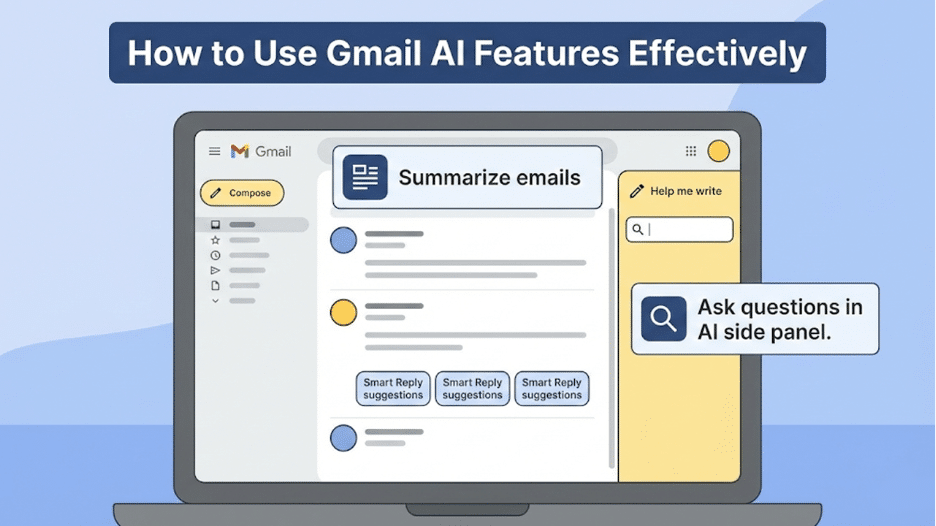
Using Gmail AI features is intuitive. Most capabilities are available directly within Gmail’s interface:
- Summarize emails with a banner button at the top of threads
- Ask for help writing via the “Help me write” icon in the compose window
- Use Smart Reply suggestions below received messages
- Ask questions in the AI side panel to search your inbox or Drive contents
These features are usually enabled by default for users with supported plans, including Google Workspace subscriptions or Google One plans that include AI access.
Privacy, Data Security, and Control in Gmail AI Features
Google’s AI advancements are a huge benefit to users; however, they also emphasize the importance of user control and privacy. Users have the option of customizing or disabling AI capabilities within their Gmail and Workspace settings. Google states that it does not sell or otherwise exploit personal data. Sensitive identifiers are also excluded from the AI training process. Nonetheless, users should always independently review their privacy settings to confirm that they reflect their personal preferences.
Who Can Access Gemini in Gmail AI Features?
Not all Gmail users can immediately see every AI feature. Its availability often depends on factors such as:
- Google Workspace plans
- Google One AI Premium subscriptions
- Regional feature rollouts and account settings
Some users have reported that only Workspace or premium plans have advanced features, while free accounts may still have limited access.
Limitations of Gmail AI Features
Although Gmail AI can be powered by Google Gemini, which offers the excellent benefits of productivity, there are some limitations that users will need to be aware of:
- Limited availability: Not all Gmail AI features are yet available, and may not apply to all regions or accounts.
- Paid access required: Advanced features are usually offered with Google Workspace or Google One AI Premium plans.
- Accuracy concerns: Like any AI-powered writing tool, including an AI Email Writer, Gmail’s AI-generated responses may not always match your exact intent, tone, or context, so reviewing drafts is important
- Manual review needed: AI-written drafts commonly need to be edited prior to dispatch, particularly in professional communications.
- Privacy considerations: When handling sensitive data, users must consider the AI settings and permissions to ensure that they have full control of their data.
These limitations will assist users in using the Gmail AI features more efficiently without affecting the accuracy, privacy, and control.
The Future of AI in Gmail
The future of Gmail AI features is a fast moving one, and with constant improvement in artificial intelligence, the way users interact with email is transforming. With the rise in the intelligence and context-awareness of AI, Gmail will likely evolve beyond assistance and move to the fully automated communication workflow.
In the coming years, users can expect:
- Intelligent automation, capable of composing, sending and structuring email messages with a minimum of human intervention.
- Emails that are written by voice and commands that are executed at a faster rate to communicate with others.
- Predictive responses that respond to the personal style of writing and previous communication.
- Greater integration with productivity tools, CRM systems and data platforms.
Furthermore, AI-enabled functionalities can be used in conjunction with such tools as Reverse Email Lookup, allowing users to identify an unknown sender, verify the contacts, and enhance email safety and personalization.
As these innovations continue to develop, Gmail is set to become not just an email platform, but a centralized productivity hub that intelligently manages communication, data, and workflows in one place.
Final Thoughts
The integration of Gemini AI in Gmail transforms the way we interact with email. Using AI-powered advanced features such as smart summaries, AI message drafting, contextual replies, intelligent inbox search and scheduling assistance, Gmail has become a productivity hub that is driven by state-of-the-art intelligence. It is no longer just a messaging platform.
Gmail AI features serve multiple people. They can help support busy professionals dealing with dozens of emails every day as well as people looking for more customized and simplified inbox experience. These advanced features within Gmail can transform the way you work with email.
FAQs
Q1. What AI features are available in Gmail?
Gmail now offers AI features like email summarization, contextual Smart Replies, AI-generated draft help, advanced inbox search, and scheduling suggestions via Google Gemini.
How does Gemini in Gmail improve email writing?
Gemini can rewrite drafts for clearer tone, generate full replies from prompts, and tailor suggestions to the context of your email content.
Can AI summarize long Gmail threads automatically?
Yes, Gemini can produce concise summaries of long email conversations, helping you catch up quickly without manual reading.
Do I need a subscription to use AI features in Gmail?
Advanced AI features are tied to Google Workspace and certain Google One plans, although basic contextual suggestions may be available more widely.
Is my Gmail data safe with AI features enabled?
Google states that it prioritizes privacy and does not sell personal data. Users can also control or disable AI features in settings to protect their preferences.
Is Gemini AI free in Gmail?
Gemini AI is not totally free. Although certain basic services might be offered to regular users, more advanced services are usually offered under Google Workspace and Google One AI Premium plans.
How accurate are Gmail AI summaries?
The AI summaries that Gmail provides are normally trustworthy when it comes to identifying the main points, but people still need to read their summaries to avoid neglecting important context.
Can Gmail AI write emails automatically?
Yes, the Gmail AI can compose complete email drafts through the short prompts using the Help me write feature, and this makes email composition faster and more efficient.